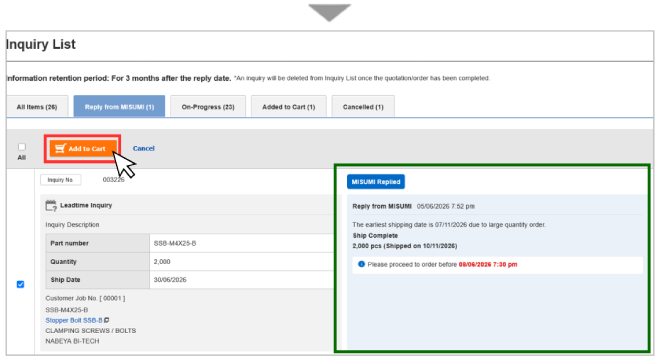
Parts Inquiry during Quotation / Order
Inquiry to MISUMI during Quotation / Order
When you generate quotation / order in the website, if you face any error messages, you can click on  to check and support you.
For items without errors, you may proceed to complete your quotation or order first.
For parts that you have clicked on "Contact MISUMI", they will be excluded from the quotation / order and flow to the "Inquiry" list in your MISUMI account. You can quote / order these parts after MISUMI has resolved the error via the "Inquiry" list.
Examples of Scenarios to "Contact MISUMI"
1) Part Number exceed available QTY:
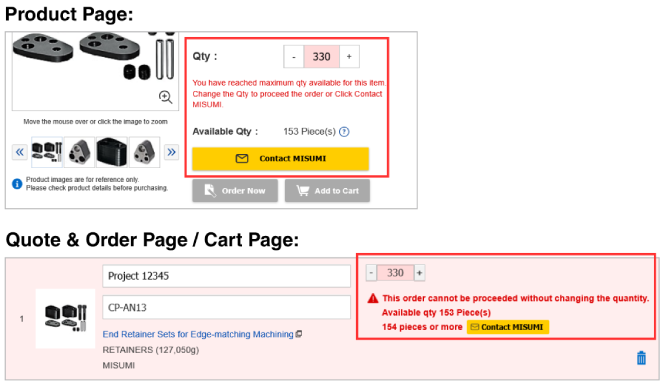
2) Part Number not matching:

How to send inquiry through "Contact MISUMI"
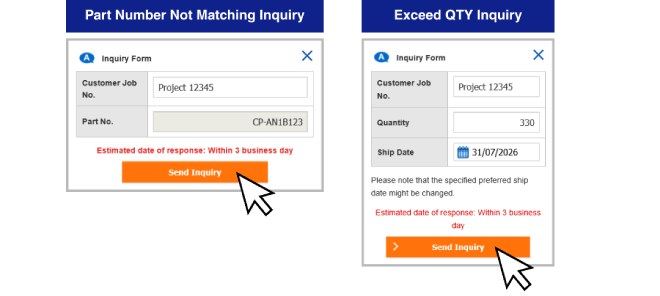
Click on and a pop up will appear. Check the auto-filled details. For Exceed QTY inquiries, please select your desired ship date. Customer job no. is filled in automatically for easy reference.
Afterwards, click Send Inquiry. *Response within 3 business days
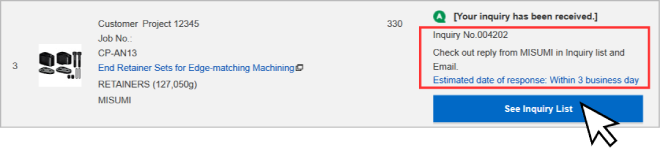
After submitting, you can refer to Inquiry List / check your email for updates.
Do take note of the Inquiry number.
Checking Inquiry Status & Add To Cart after inquiry resolved
You will be notified of updates through email, or when there is a red notification bubble:
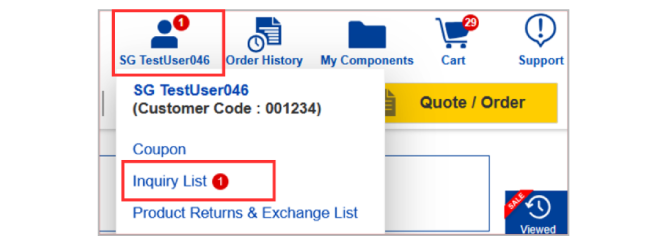
For inquiries that have been replied by MISUMI, please refer to "Reply from MISUMI" tab.

You can add to cart to quote / order for the resolve part.