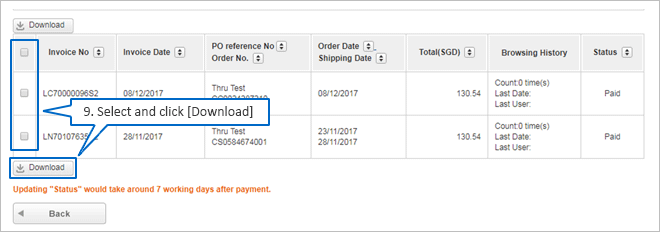
How to download Invoice online
To download invoice, please follow the instructions below:
- *Please note that you will need to log into your account to download Invoice.
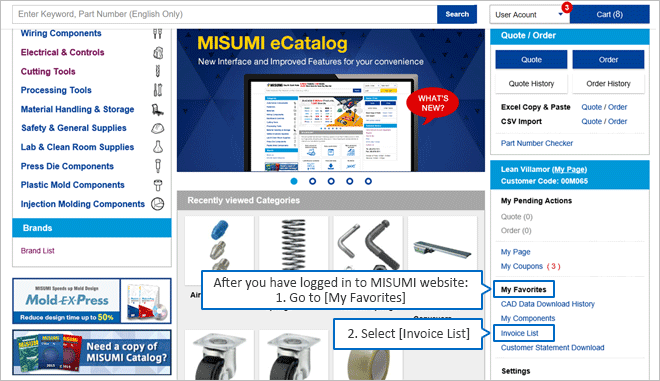
Go to Order History Page
1 Log in to your MISUMI Account.
2 Click on "Order History" on the top right corner menu.
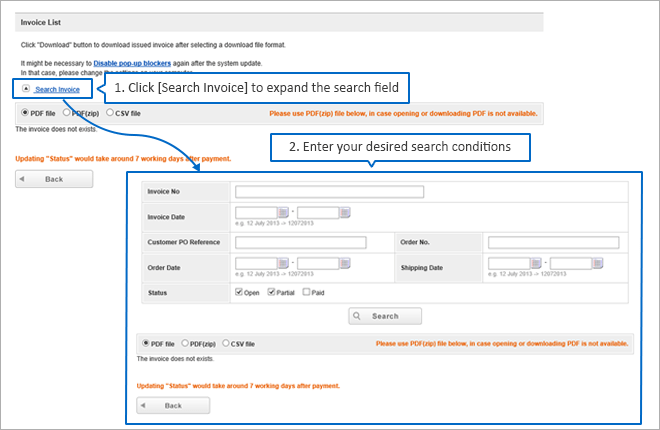
Search Orders to download invoice
1 Filter for the Order(s) you'd like to download invoice from.
2 Click Search.
Download Invoice
1 Click on "PDF" from the order(s) you'd like to download invoice from.
2 A dropdown menu will appear. Click on "Packing List".
*Note: Invoice can only be downloaded after the order has been Shipped